How it works

A loop that pays the guest first.

Every part of this runs on one printed code and the guest's own answers. Nothing here requires the guest to download anything or to trust a stranger with their data before they have been given something.

The experience loop

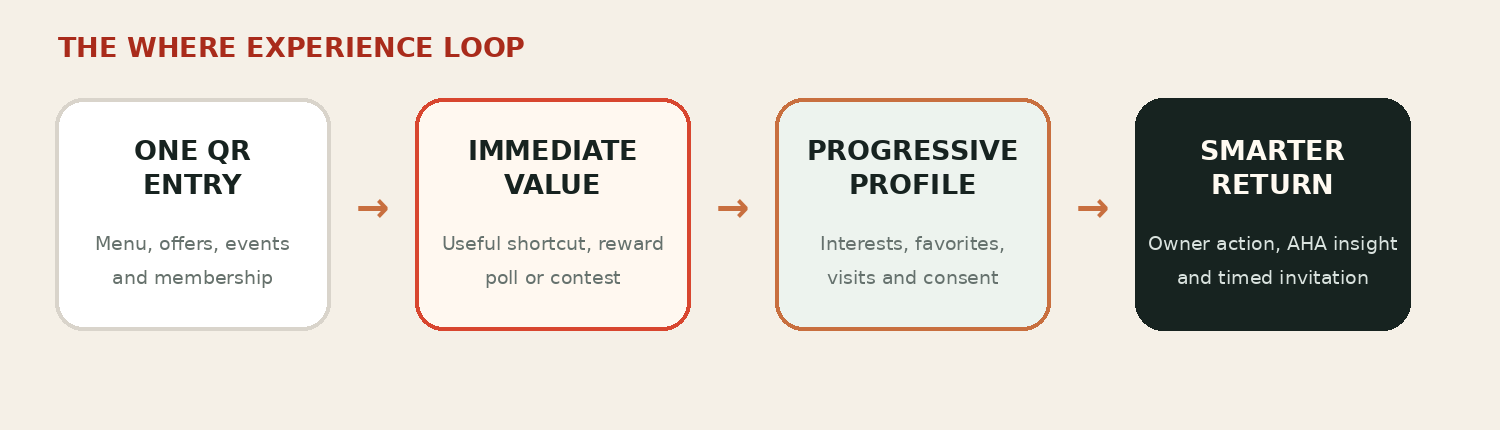
One QR entry, immediate value, progressive profile, smarter return.

The loop is the product. Each step is small enough that a guest completes it without deciding to, and each one leaves the restaurant knowing something it did not know before.

The experience loop: one QR entry leads to immediate value, which builds a progressive profile, which produces a smarter return.
  1. One QR entry

    Printed at the table. One scan, no app install, no account creation before value.

  2. Immediate value

    A reward, a vote, or a drop lands first. The guest is ahead before anything is asked.

  3. Progressive profile

    Preferences accumulate from choices the guest made on purpose — a menu item built, a poll answered, a birthday saved.

  4. Smarter return

    The next invitation names its own reason, because the profile can supply one.

The two surfaces

Warm for the guest, operational for the owner.

The guest never sees the console, and the console never speaks in the guest's voice. Keeping those apart is deliberate.

Guest

The guest experience

The restaurant's own brand, inside the phone. Warm, local, and specific to the room the guest is sitting in.

  • Entry — one scan, then the reason for the visit
  • Demo Menu with the item builder
  • Happier Hour? Vote Now!
  • Dessert Drop and the wallet
  • Private events, with a custom invite

Owner

The owner console

Compact modules over a warm field. Each one carries its own in-context editor and its own insight.

  • Overview
  • Members and rewards
  • Polls and contests
  • Event leads
  • Reviews
  • Social calendar

Illustrative sample data

Menu Explorers spend more on their second visit than on their first.

Guests who built an item in the Demo Menu returned with a larger average order than guests who did not, and they ordered outside the category they started in.

Signals

  • Item builder completions
  • Second-visit order value
  • Category spread on return
  • Menu Explorer badge earned

Offer the Menu Explorer cohort a small tasting reward on the category they have not tried yet.

Draft the rewardRequires POS

Source: connected dataset — menu, visits, orders

Questions

The ones we are asked first.

Does the guest have to install anything?

No. The entry point is a printed QR code and the experience runs in the browser the phone already has.

Who owns the guest relationship?

The restaurant. The profile, the consent, and the permission to contact the guest belong to the venue, not to a platform sitting between it and its guests.

What happens before the POS is connected?

Everything that does not depend on transaction data. Anything that does is labelled Requires POS in place, so it is clear what is live and what is waiting.

How is anything sent to guests approved?

By a person. Drafting is assisted; sending is not. Anything externally visible needs human approval before it goes out.

Is the data on this site real?

No. Every figure shown here is labelled illustrative sample data, and every statistic carries its source.

Become The Where

Become the place they call theirs.

We work with a small number of founding restaurants at a time.